
201 lines
8.1 KiB
Markdown
201 lines
8.1 KiB
Markdown
# A high-level view of the internals of Fission.
|
|
|
|
## How it works
|
|
|
|
Fission is a FaaS -- users create functions (source level), register
|
|
them with Fission using a CLI, and associate functions with triggers.
|
|
|
|
Fission wraps those functions into a service and runs them on
|
|
Kubernetes on demand.
|
|
|
|
Here's an overview of the services that make up Fission.
|
|
|
|
## Components
|
|
|
|
Core Components:
|
|
* Controller
|
|
* Executor
|
|
* Environment Container (language-specific)
|
|
* Router
|
|
* Builder Manager
|
|
* Storage Service
|
|
|
|
Optional Components:
|
|
* Logger
|
|
* Kubewatcher
|
|
* Message Queue Trigger
|
|
* Timer
|
|
|
|
Third-party components:
|
|
* InfluxDB: To store function logs.
|
|
* Prometheus: For metric collection and canary deployment.
|
|
* NATS Streaming: For message queue trigger. (Kafka, Azure are not included in charts deployment.)
|
|
|
|
## Core Components
|
|
|
|
### Controller
|
|
|
|
The controller contains CRUD APIs for functions, triggers, environments,
|
|
Kubernetes event watches, etc. This is the component that the client talks to.
|
|
|
|
All fission resources are stored in kubernetes CRDs. It needs to be able to
|
|
talk to kubernetes API service.
|
|
|
|
### Executor
|
|
|
|
The executor has two simple APIs; the router calls both these endpoints.
|
|
|
|
* GetFunctionService takes function metadata and dispatches the corresponding executor
|
|
type to get the address of a service/pod and returns it to the router.
|
|
|
|
* TapService lets executor know a service/pod is being used; if it's not
|
|
called for a few minutes the pod(s) backing the service are killed.
|
|
|
|
It now supports two different executor types:
|
|
|
|
* PoolManager
|
|
* NewDeploy
|
|
|
|
These two executor types have different strategies to launch, specialize, and manage pod(s).
|
|
You should choose one of the executor types wisely based on the scenario.
|
|
|
|
#### PoolManager
|
|
|
|
PoolManager manages pools of generic containers and function containers.
|
|
|
|
PoolManager watches the environment CRD changes and eagerly creates generic pools
|
|
for environments. It uses Kubernetes deployments to do that. The
|
|
environment container runs in a pod with the 'fetcher' container.
|
|
Fetcher is a straightforward utility that downloads a URL sent to it
|
|
and saves it at a configured location (shared volume).
|
|
|
|
The implementation chooses a generic pod from the pool, relabels it to
|
|
"orphan". The pod from the deployment invokes fetcher to copy the function
|
|
into the pod and hits the specialize endpoint on the environment container.
|
|
This causes the function to be loaded. The pod is now specific to that
|
|
function. This function pod is cached; it's cleaned up if it's unused for a few minutes.
|
|
|
|
PoolManager selects a generic pod from the warm pool, specializes it,
|
|
and recycles the pod if there are no further requests to the function after a few minutes.
|
|
It makes PoolManager suitable for functions that are short-living
|
|
and requires a short cold start time [1].
|
|
|
|
However, PoolManager only selects one pod per function, which is not
|
|
suitable for serving massive traffic. In such cases, you should consider
|
|
using NewDeploy as executor type of function.
|
|
|
|
[1] The cold start time depends on the package size of the function. If it's
|
|
a snippet of code, the cold start time usually is less then 100ms.
|
|
|
|
#### NewDeploy
|
|
|
|
NewDeploy creates deployment, service, and HPA for functions in order to handle
|
|
massive traffic.
|
|
|
|
NewDeploy watches the function CRD changes and creates a Kubernetes deployment,
|
|
service, and HPA for a function. NewDeploy will scale the replicas of a function
|
|
deployment to the minimum feasible scale setting, if the minimum scale setting of
|
|
a function is greater than 0. The 'fetcher' inside the pod uses a URL in the
|
|
JSON payload, which is attached as a parameter to start fetcher, to download the
|
|
function package instead of waiting for calls from NewDeploy.
|
|
|
|
When a function experiences a traffic spike, the service helps to distribute the requests to
|
|
pods belonging to the function for better workload distribution and lower latency. Also,
|
|
the HPA scales the replicas of the deployment based on the conditions set by the user.
|
|
|
|
This approach though increases the cold time of a function, but also makes NewDeploy
|
|
suitable for functions designed to serve massive traffic.
|
|
|
|
### Environment Container
|
|
|
|
Environment containers run user-defined functions and are language-specific.
|
|
Each environment container must contain an HTTP server and a loader for functions.
|
|
|
|
The pool manager deploys the environment container into a pod with fetcher
|
|
(fetcher is a simple utility that can fetch an HTTP URL to a file at a
|
|
configured location). This pod forms a "generic pod" because it can
|
|
be loaded with any function in that coding language.
|
|
|
|
When the pool manager needs to create a service for a function, it calls
|
|
fetcher to fetch the function. Fetcher downloads the function into a
|
|
volume shared between fetcher and this environment container. Poolmgr
|
|
then requests the container to load the function.
|
|
|
|
### Router
|
|
|
|
The router forwards HTTP requests to function pods. If there's no
|
|
running service for a function, it requests one from executor, while
|
|
holding on to the request; the router will forward the request to
|
|
the pod once the function service is ready.
|
|
|
|
The router is the only stateless component and can be scaled up if needed, according to
|
|
load.
|
|
|
|
### Builder Manager
|
|
|
|
The builder manager watches the package & environments CRD changes and manages
|
|
the builds of function source code. Once an environment that contains a builder
|
|
image is created, the builder manager will then creates the Kubernetes service
|
|
and deployment under the fission-builder namespace to start the environment
|
|
builder. And once a package that contains a source archive is created, the
|
|
builder manager talks to the environment builder to build the function's source
|
|
archive into a deploy archive for function deployment.
|
|
|
|
After the build, the builder manager asks Builder to upload the deploy archive to the
|
|
Storage Service once the build succeeded, and updates the package status attached with build logs.
|
|
|
|
### Storage Service
|
|
|
|
The storage service is the home for all archives of packages with sizes larger than 256KB.
|
|
The Builder pulls the source archive from the storage service and uploads deploy archive to it.
|
|
The fetcher inside the function pod also pulls the deploy archive for function specialization.
|
|
|
|
## Optional Components
|
|
|
|
### Logger
|
|
|
|
Logger is deployed as DaemonSet to help to forward function logs to a centralized
|
|
database service for log persistence. Currently, only InfluxDB is supported to store logs.
|
|
|
|
Following is a diagram describe how log service works:
|
|
1. Logger watches pod changes and creates a symlink to the container log if the pod runs on the same node.
|
|
2. Fluentd reads logs from symlink and pipes them to InfluxDB
|
|
3. `fission function logs ...` retrieve event logs from InfluxDB with optional log filter
|
|
4. Logger removes the symlink if the pod no longer exists.
|
|
|
|
### Kubewatcher
|
|
|
|
Kubewatcher watches the Kubernetes API and invokes functions
|
|
associated with watches, sending the watch event to the function.
|
|
|
|
The controller keeps track of the user's requested watches and associated
|
|
functions. Kubewatcher watches the API based on these requests; when
|
|
a watch event occurs, it serializes the object and calls the function
|
|
via the router.
|
|
|
|
While a few simple retries are done, there isn't yet a reliable
|
|
message bus between Kubewatcher and the function. Work for this is
|
|
tracked in issue #64.
|
|
|
|
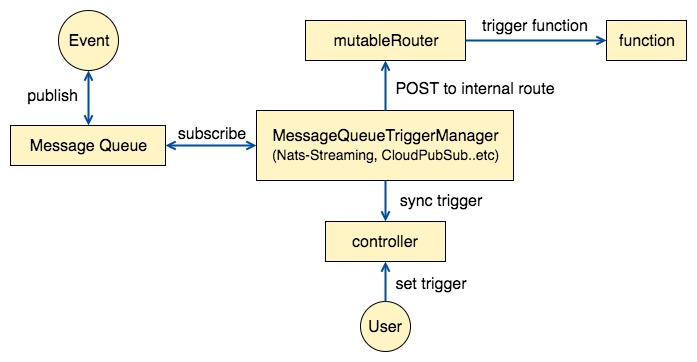
### Message Queue Trigger
|
|
|
|
A message queue trigger binds a message queue topic to a function:
|
|
Events from that topic cause the function to be invoked with the
|
|
message as the body of the request. The trigger may also contain a
|
|
response topic: if specified, the function's output is sent to this
|
|
response.
|
|
|
|
Here's a diagram of the components:
|
|
|
|
|
|
|
|
### Timer
|
|
|
|
The timer works like kubernetes CronJob but instead of creating a pod to do the task,
|
|
it sends a request to router to invoke the function. It's suitable for the background tasks that
|
|
need to executor periodically.
|
|
|
|
The timer works like a Kubernetes CronJob, but instead of creating a
|
|
pod to do the task, it sends a request to the router to invoke the
|
|
function. It is suitable for background tasks that need to execute periodically.
|